Wednesday, February 24, 2010

Wordpress Flickr Manager Broken? Possible fix for you

Hey, I am remembering to write this one down right after I solved the problem. Aren't you proud of me?

So, open source software is great. All those free apps, and free doodads you can run on your website! Shopping carts, project management sites, wordpress plugins...Yay!

Except when they break and the developer has stopped working on them.

Wordpress is a great piece of open source software, but I have seen two of the plugins I rely upon for clients go unsupported in the past year.

The latest one is the Wordpress Flickr Manager(WFM), which makes it easy for people to post their own pictures on their sites without having to ftp them and figure out what the URL is for the image. (Note: Wordpress has a native image uploader now, but the Wordpress Flickr Manager still has some advantages. One, it has a built in Lightbox javascript pop-up image display; Two: if the site owner will add tags and a link to the proper blog page in the image descr. on flickr, it becomes another source of traffic for the blog/site.)

WFM hasn't been updated for the latest versions of Wordpress, so the built in Lightbox function isn't working anymore. You can still insert Flickr pictures, but the Lightbox effect doesn't work, and you can't upload pictures via the plugin.

However there are fixes!

First of all, you need to edit some files in the plugin's folder. I don't have to tell you to use a text editor like Window's Notepad, or Notepad++ (Free Code Editor), do I?

In order to fix the Lightbox not working issue, edit wfm-lightbox.php and wfm-hs.php and remove the @ characters from the file. (2 in each file). Those php files are in the /js folder inside the plugin's folder. This solution was found here: Plugin Broken With WP2.8.

In order to fix the upload issue, comment out line 139 in FlickrCore.php like this

Change this:
echo 'Content-Type: ' . mime_content_type($filename) . "\r\n";

Into this:
// echo 'Content-Type: ' . mime_content_type($filename) . "\r\n";

This 'solution' was found here: Uploads don't work local. I have no way of knowing what commenting out that line really does, so use at your own risk.


Monday, February 08, 2010

Replacing RAM in Inspiron 2600/2650

My Girlfriend's computer died.

It was sad.

We cried.

Then I started troubleshooting. It would sort of boot up....ahhh, I can't remember. I need to write these darn blog posts right after the incident.

Anyhow, I thought maybe bad RAM. I used the <God Voice>Ultimate Boot CD</God Voice> to do a memtest and yeah, bad RAM.

("BAD RAM! Get back under the trailer!" )

Luckily I just happened to have a spare module hanging around. I got my jewelers screwdrivers and started taking plastic bits off the bottom of the laptop. And Lo! There was only one RAM stick accessible by this route. WTF? And, it wasn't the RAM that I needed to replace. ARGH! Where the heck did they put the other RAM, and what kind of muttonhead engineer would put it in a place where you can't easily get to it?

I unscrewed all the rest of the screws on the bottom of the laptop, and then, when the bottom didn't come off easily, I paused.

  1. This was not going to be easy to take apart. Laptops can be a real pain to get apart, and back together again. Like, 4 layers and little plastic snap tabs, and tiny hidden screws pain.
  2. Upgradeable parts are usually easy to get to.

Even though it is against the Man Code to read directions, I have learned through painful experience that it is usually faster to follow directions than to try to strike off into the wilderness of little plastic snap tabs.

So, I found this site: How to disassemble a Dell Inspiron 2650. This guy is SOO awesome for going to the trouble to post all the pics of the Inspiron 2650 disassembly procedure. I just wanna click all over his Google ads. But he doesn't have any

Turns out that the RAM module was pretty easy to get to. I just had to lift out the keyboard which was actually fewer screws than those that hold the bottom plate on.

The new RAM is playing nicely with the old RAM and the old computer is humming along nicely on its mission of email and web browsing.

Tuesday, August 18, 2009

Palm 755p Error Log

Dial #*#377# to see the Palm 755p Error Log. Helps with troubleshooting spontaneous restarting of the palm device. My palm started rebooting when I accessed a certain item in the Memos. Then this problem got worse, and it started rebooting when I accessed ANY Memos. I see on teh intarwebs that people experience this sort of problem with restarting from corrupted txt messages, corrupt downloads like ringtones, or email attachments.

I am trying to update the vzw software using the desktop updater that verizon provides for the Treo 755p.

Update: the updater, and restore via hotsync worked. Now I just need to get the phone reprogrammed or see if I can get *228 to work.

Monday, June 22, 2009

Jammie Thomas-Rasset verdict: 1.92 million?!?

Heh heh, like they will ever see that money. It's ridiculous. If I were in her position I would just laugh. What are they going to do? They can't take her car, they can't keep her from renting a house. They can garnish 25% of her wages. They will never see more than a few thousand dollars of this award and the obvious overkill in the award just makes them look horrible in the public eye. I wish the entire music industry would fail, big bank style, and publish zero new albums next year. This would be of great benefit to our society, as then people would go listen to live music, or, land sakes, make their own music at home.

Sunday, June 21, 2009

Problems with Vista 64bit

Problem number 1: there is no 64 bit version of Adobe Flash to use in 64bit IE. Solution? Use Firefox. Why the heck are you using IE anyhow? Problem number 2: Verizon and Palm do not make drivers for 64 bit windows for the 755p Treo. So you can not hotsync via USB cord, nor can you use VZ access manager to connect to the internet. Solution? Use USBmodem. Problem number 3: Not sure if this is a 64bit problem, but, I used Microsoft Update to get a selection of security updates, and after I was done, Windows had changed my update settings to 'update automatically'. I noticed this because the tray icon for windows update was there this morning. "Downloading updates," it said. "No, you are not," I said. I never use automatic updates, because Microsoft patches are not known for their stability, and MS often tries to slip in a new program or two when you update, like WGA or IE 8. Solution? Turn off updates. Change update settings to 'Never Check for Updates.' This means that you have to keep track of which updates are reliable on your own. I use AskWoody to get the scoop on which updates to skip for awhile. I also have a good antivirus program and I use Firefox instead of IE. Always get the updates for Windows Defender, Malicious Software Removal Tool, and Junk Mail Filters for Outlook (if you use Outlook). Problem number 4: My Razer Diamondback 3G mouse doesn't do center-click. It doesn't show up in the mouse control panel applet. There is no way to adjust it's settings except with the 3G driver applet, and it doesn't list center-click as an option. This is a problem for me, as I center-click links all the time to open them in a new tab. Solution? I discovered by trial and error, that 'Universal scroll' in the 3G applet works as center-click, instead of providing a scroll.

Wednesday, June 17, 2009

My chat session with Dell sales

Horrible salesmanship. Neither agent greeted me. Neither tried to see what they needed to do to close the sale, or offered to take my order. Neither had a sense of humor. They both missed questions in my text and didn't answer them. Neither said goodbye-have a nice day when our session ended. I am literally sitting here with my credit card in hand and their doofus agents couldn't close the sale. Their sole effort to sell me was to paste a system in front of me. They didn't even extol the virtues of these systems or explain why they thought these systems suited my needs.

Tuesday, March 24, 2009

Eternal Silence is a Kick Ass HL2 Mod

Eternal Silence is a kick ass mod.

It's a space and shipboard combat game.

Each match starts out with both teams boarding ships to go bomb the other side's defensive corvettes, and defending their own corvettes. When one team succeeds in blowing up all three of the other team's corvettes, then the game mode changes, and the successful attackers invade the enemy capship and attempt to capture all the subsystems on the enemy's capship. This phase is timed, and when the timer runs out, new corvettes spawn in and the capship attack phase is over until all the corvettes are gone again. The timer can be stopped, though, if the attackers capture one of the capships subsystems. As long as the invaders hold one of the subsystems, the timer is stopped, and they can spawn there in that subsystem room on the enemy capship. They can also fly a multiseat gunship into the enemy capship hangar and spawn in the gunship, then jump out into the enemy capship's hangar area.

There are several different classes of ships and classes of soldiers, as you would expect.

I had some problems with frame rate, and locked up movement with echoing sound when I first started playing, but I cranked my video settings down a notch and I haven't had any freezing, echoing or lagging since. The game has crashed out to windows (Vista) a couple of times on me. (but it was way past my bedtime anyhow...)

I have had a lot of fun playing this game, and in the few days that I have played it, I have been on teams that used communication and teamwork about 50% of the time, which I think is an awesome ratio for a pub game.

It would be a great game if it had resource gathering, an upgrade system and a commander mode. But it's still fun with the simple gameplay it has now. It still offers a lot of possible tactical gambits, and strategies. Games can go back and forth for awhile, generating considerable drama and impassioned combat, although the continual bombardment of the capships does bring the match to an inexorable end. It is more than fun enough to keep me up late, flying the unfriendly skies.

Tuesday, March 10, 2009

Chinese Character Problems in Zen Cart

I needed to put some links with Chinese, Thai and Japanese characters in a header on a Zen Cart home page. I had a hard time finding the place in the templates and php files where I needed to specify the utf-8 character encoding.

Eventually I stumbled on the /includes/languages/your-template/english.php file which is where the magic happens.

// charset for web pages and emails
define('CHARSET', 'utf-8');

is the way you need to make it. If you don't, then your character set will be wrong, since Zen Cart installs with iso-8859-1 by default, and you'll get nonsense characters instead of Chinese.

I don't know why I couldn't find this file...it's the obvious place to look. I guess I had the wrong english.php file open...

I also ran into a great forum post on the Zen Cart forums. A user named Incouto provides a good explanation of character sets, collation in mysql and in the php query controller.

Tuesday, February 03, 2009

Phone eats my photos

And Blogger eats blog postings...

Let me see if I can reconstitute this post.

My Razor v3m ate some of my cell phone pics tonight. I was transferring pics to my microSD card when the phone decided to erase all but two of the pictures on the card. And no, I did not accidentally choose to erase the card. Otherwise it would have gotten the two that it left behind, eh?

So I went looking for some free file recovery apps to see what I could get back.

Softperfect File Recovery is a tiny download and doesn't require an install. It quickly recovered 36 images and three .3g2 files. It didn't recover all the images and some of the images it did recover were corrupted. The .3g2 files wouldn't play.

PC Inspector File Recovery requires install. It had the same results. 36 files recovered, same corrupted files, .3g2 files won't play.

So I guess the missing/corrupted images are not gonna come back.

The PC Inspector app also has a find lost files option where it scans the media cluster by cluster, and that found a long ago deleted xls file. So you may be able to get some extra stuff back using that method.

This is the second time I have lost the contents of a microSD card. The first time, the card sprang out of it's socket and just happened to land right under the wheel of my chair. So when I turned to look for it....'crunch'.

That one: my fault. This time: yer pissin me off Motorola.

Google vs Facebook? I don't think so.

Just finished reading this article on the internal economy of Facebook. Mostly it is about Facebook's growth struggles and how recent changes in layout have hurt the businesses of lots of Facebook App Developers. But one small part was about Facebook's place in the larger web ecosystem.

The Article maintained that Facebook aims to be the OS of the Web, "making the web fundamentally social across all sites and applications." In this, it competes with Google.

"Google says the modern day operating system, or at least the starting off point on the Web, starts with search. Facebook believes it starts with people connected via social networking." ~Developers Struggle Amid Fragile Facebook Economy

This reminds me of my thinking about the web ca. 1995. There is a basic truism about the internet. People get on the net to get stuff done or to mess around. Save time or waste time. I think maybe 'search' is weighted towards saving time, and web 2.0/social apps are weighted toward the waste time end. So, Google and Facebook aren't even in the same market. Folks aren't going to get on Google to check in with their friends and they aren't going to use Facebook to find a grant for their non-profit or to search for a part number.

Thursday, January 15, 2009

Easy polaroid image generator

While looking for a way to create a polaroid image effect for a website, I ran across this easy polaroid image generator. It even has fancy shaped drop shadows. Beats all the photoshop tutorials about polaroid frames all to heck. Need to do some Fireworks work on it to give it a transparent background, though.
Sunday, December 07, 2008

Dreamweaver DOES mess with your code

I just discovered that if you edit text in design view, DW will delete comments. I had some server side code stored in a page inside a comment (an add to cart button for Miva Merchant) and while I was editing the text that comes before the commented code, I removed what I thought were extraneous trailing spaces. But when I went back to code view, I found that all my commented add to cart code was gone! Bad, Bad, Bad Dreamweaver! In order to help prevent this from happening again I went into preferences, Invisible Elements and marked the checkbox next to comments. So, now, in design view, comments show up as one of those little yellow icons. I spend most of my time in code view, so I guess that's why I never discovered this issue before, but this is really bad.

Thursday, November 13, 2008

Antivirus 2009 email going around

I thought it was an email hoax at first...you know, like the one about the 190 pound cougar that someone supposedly shot in Iowa...but I guess it's real.

Here's the email I received:

Another one, actually a malware, is called Anti-Virus 2009. It is a seriously obnoxious problem. You will go to a website that looks innocuous, and suddently this fake anti-virus program takes over your screen and you can't get rid of it. It tells you you have been attacked (which is true) and wants $39.95 or some such amount to get rid of it. This fake program looks exactly like Microsoft's anit-virus program and is a royal pain in the ass. Internet Explorer is made inoperable when it strikes. It was apparently created by some Russian creeps who now distribute it like some kind of franchise. It tried to mess with my Mac, too, but either couldn't get a grip or the program I have for malware, spyware, and other obnoxious stuff stopped it.

The only way I could get rid of it on my wife's pc was to downloadmbam-setup.exe from Malwarebytes.com onto my Mac, make a CD of it, install on her machine, and turn it loose. I have the program, and if you want it I'll send it along.

It sure reads like one of those hoax emails that goes around. Microsoft doesn't have an antivirus program, for one thing. Also, why is anyone still using Internet Explorer? Haven't we learned our security lessons about Microsoft software yet?

I always wonder how much Microsoft gets paid by the antivirus software companies to stay out of the market. I mean, the fact that windows is insecure is their fault. And, they are certainly happy to take over the business model of any other company that writes software.

Anyhow, a little digging revealed that it's a malware program that you get by going to a bad or compromised website.

Another method of distributing Antivirus 2009 involves tricking you by displaying deceptive pop-up ads that may appear as regular Windows notifications with links which look like buttons reading Yes and No. No matter which "button" that you click on, a download starts, installing Antivirus 2009 on your system. Antivirus 2009 installs on your computer through a trojan and may infect your system without your knowledge or consent.

So yeah. Hope the guys who wrote this get their karmic comeuppance.

The other thing that was a surprise to me in that email, was the fact that Malwarebytes is a real program, and that a lot of people recommend it. I hadn't heard of it yet, which is strange cause I get asked to help people with this sort of problem a lot and so I pretty much keep up with developments in the field. Not lately, I guess.

Just for fun, here are a couple of links that talk about removing this spyware.

Enigmasoftware Antivirus 2009 Removal Instructions

Removal instructions at BleepingComputer

Note that I am not recommending Enigmasoftware or Bleepingcomputer or their instructions as I have not had this problem and so don't have any personal experience getting rid of it (yet).

So, use Firefox and keep your shields up when you stray off the beaten path! (how's that for mixed metaphores?)

Wednesday, November 12, 2008

Left4Dead demo has a virus in it?

(Update: I was using an old, trial version of Nod32. Updated copies of Nod32 apparently did not make this mistake.)

At least that's what Nod32 thought.

I installed the demo via Steam and after it finished (2GB download!), I tried to launch the game.

Steam told me, "This game is currently unavailable. Try again later."

Weird.

So I g-g-googled it, and the Steam knowledgebase told me to rename ClientRegistry.blob, to delete a bunch of files in the Steam folder, to verify the game cache...yada yada.

What the problem was, was that Nod32 quarantined the Left4Dead executable. I just happened to notice the quarantine take place when I tried reinstalling the game.

So, I set Nod32 to exclude the Left4Dead folder from scanning. Now it works.

Except for the stutter.

Also, Left4Dead is going to be a Really Fun Game.

:-)

Tuesday, November 11, 2008

Electromagnetic radiation is unlikely to cause cancer

I think this is interesting...
The proton precession magnetometer operates on the principal that the protons in all atoms are spinning on an axis aligned with the magnetic field. Ordinarily, protons tend to line up with the earth's magnetic field. When subjected to an artificially-induced magnetic field, the protons will align themselves with the new field. When this new field is interrupted, the protons return to their original alignment with the earth's magnetic field.
I didn't know that protons had any spin on them. Cool.
Here is some more info: about solar radiation.
"Insolation is a measure of solar radiation energy received on a given surface area in a given time."
"The radiant power is distributed across the entire electromagnetic spectrum, although most of the power is in the visible light portion of the spectrum. The Sun's rays are attenuated as they pass though the atmosphere, thus reducing the insolation at the Earth's surface to approximately 1000 watts per square meter for a surface perpendicular to the Sun's rays at sea level on a clear day."
I thought it was 100 watts, but it's 1000. That's the peak power. The average is 250 watts:
"The actual figure varies with the Sun angle at different times of year, according to the distance the sunlight travels through the air, and depending on the extent of atmospheric haze and cloud cover. Ignoring clouds, the average insolation for the Earth is approximately 250 watts per square meter (6 (kW·h/m²)/day), taking into account the lower radiation intensity in early morning and evening, and its near-absence at night."
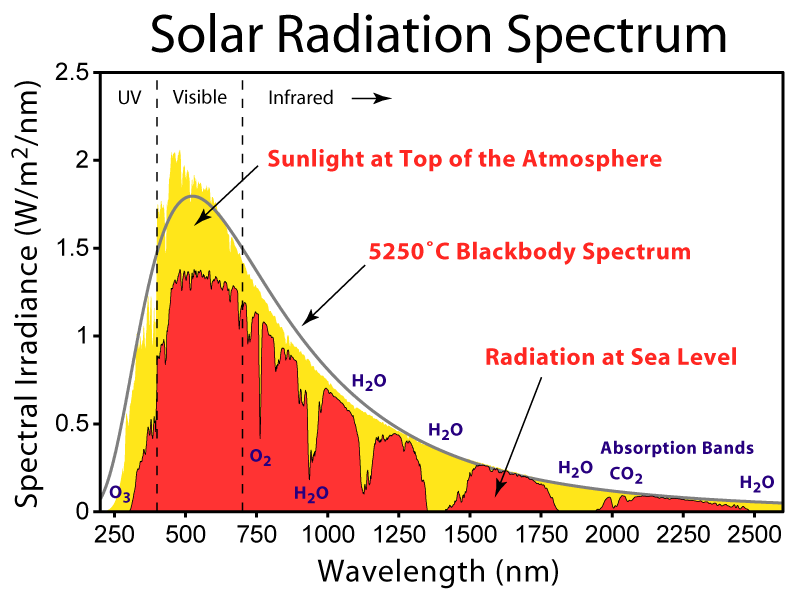
Image:Solar Spectrum.png
Here is a chart of the wavelengths of solar radiation at the top of the atmosphere (yellow), and reaching the surface (red). Cell phone frequencies are on the infrared side of visible light...wayyy off the chart on the right.
(A nm is a nanometer, 1 billionth of a meter. Cell phone signals are at a wavelength of a foot, or 304,800,000 nm. Microwave ovens are at a wavelength of 112,400,000 nm or 4.8 inches.)
Now, as we go left on the chart, the emf's have more energy. X-rays are off the chart on the left. They are called ionizing radiation. They have so much energy they can break the bonds that hold molecules together, creating ions. They can break molecules in cells, in the DNA.
RF radiation does not have enough energy to break molecules.
X-rays have about 1,000 eV of energy, while the photon energy of radio waves from cellular phone towers is about one millionth of an eV, not enough to alter molecules in the body.

The difference in energy: 1000 vs 0.000,001

Looking at the chart, RF radiation is to the right of Infrared radiation, therefore, RF radiation has less energy than the infrared radiation from your oven, or fireplace. Even visible light has more energy than EMFs.
And, here is some info from Cancer.org
Moreover, public exposure near cell phone towers (Way more juice than your phone) is not significantly different than background levels of RF radiation in urban areas from other sources, such as radio and television broadcast stations.

What Does the Epidemiologic Evidence Say?

No human studies have focused specifically on cellular phone towers or even on radio waves more generally. Several studies have looked at the effects of radio waves and microwaves combined; these have generally not shown any increase in cancer, except for a US Air Force study that suggested an increase in brain tumors in association with radiofrequency/microwave exposure.

What Does the Animal Evidence Say?

A number of animal studies have been conducted, generally showing no carcinogenic (cancer-causing) effect of radio waves. Several experiments have used exposure levels that cause a rise in tissue temperature(!), and even in these studies, there was no increase in DNA mutations or in cancer. A recent review concluded that: "The scientific evidence indicates that exposure to radiofrequency radiation fields is not mutagenic and is therefore unlikely to act as an initiator of carcinogenesis.” (Emphasis, mine)

If you want to know about how microwave ovens work:
Solar radiation:
Cell phone radiation from Cancer.org
with lots of references and citations
Off on a tangent...Again.

Thursday, October 23, 2008

How to deal with Spam

If you Don't Already Get Spam
First and foremost, never put your email address anywhere out the internet where it will be visible on a page. If you do put it out there, you will get spam. Do not register a domain name without whois protection. If your registrar can't hide your email in the domain registration records, use a Gmail acct for your domain contact.(see below).

Next, Have two email addresses.

One gives you everything you really need to see, the other is for all the misc. stuff.

Your PRIVATE email is one that you only give out to real actual live people (and maybe your bank or another business with which you have a private and trusting relationship)

The other email is your PUBLIC email address, and I suggest a Gmail address for this, because Gmail has the greatest spam filters in the world. This address is used for newsletters, Amazon orders, and friends that like to send FW: RE: emails.

I collect email from these two addresses in two separate email programs (Outlook and Thunderbird). That way my private email account only gets mail from people I REALLY want to hear from. It cuts down on the distractions in a BIG way.

If you give your email address to someone who likes to send FW: RE: type emails, get them to change to start sending stuff to you at your public (Gmail) account, or sooner or later your PRIVATE email addr will end up on a computer that is virus infected and you will start to get spam. This has happened to me.

For an email address that gets spam, a couple ideas.
You can set up Gmail to receive your email, and then you can set up Gmail and your email program (Outlook, Thunderbird...) to get the email from Gmail. That way your email gets filtered by Gmail. Gmail's filters are so good that one of my clients had 2000+ spams filtered out, 2 that got through and no false positives.

Outlook has pretty good spam filters. Update Outlook at Office Update, and then set Outlook's junk mail options to High. What happens for me is that almost all the spam goes into the Junk folder, and I also get false positives on a regular (predictable) basis. The false positives are fairly easy to deal with. I only get them once, and I only get them from new correspondents. I keep and eye on the contents of my junk folder and 'mark as not junk' any emails coming from a real person. Now, I don't have a lot of new correspondents, and I don't get thousands of spams, so this works for me.

If you have your own domain and website, you can even change your MX records so that Google apps for domains collects your email, instead of your hosting company's email servers. Again, you get the benefit of Gmail's awesome spam filters. I set this up for a client and it's been awesomely successful. It's transparent for the client, he just collects his email in Outlook the same way he did previously.

Get an Antivirus program - You absolutely must have an antivirus program.
AVG Free Download
Comodo Antivirus free
NOD32 - Best paid antivirus

Wednesday, October 22, 2008

Horribly Wrong: Adwords keyword tool advertiser competition

Google's Adwords Keyword tool supposedly shows how much competition there is for a given keyword phrase, but sometimes when I perform a search on that keyword in Google, I see no ads whatsoever.

Here is an example:
According to Adwords there is a medium high degree of advertiser competition for the phrase "visa logo"

Click for larger image

Yet when I go to Google and do a search for "visa logo" I get zero ads.

Click for larger image

So, what is going on here?

When I am working with Adsense or Adwords I have started doing searched to verify that there are competing ads in Google. In Adsense, if you are trying to write content for a high competition ad, to get highly paid clicks, then you will want to know that there really are NO advertisers for that keyword.

In Adwords, no advertisers can mean a niche that none of your competitors have discovered, which is like finding money on the street.

Your thoughts?

Monday, September 22, 2008

Letter to send to friends who FWD emails

Hi xx,

Like 99.9% of these forwarded emails, this one is also not true.

[http://www.snopes.com/inboxer/missing/penny.asp]

Snopes is a really good place to check the truth of FW[re:] fw: RE: type emails. Or, you can safely ignore ALL these types of emails. In 14 years of internet usage I have only ever seen two that were true. (One was the "uses of bounce sheets" email, which had a few true items on it).

Pepsi and AOL are not going to give us $123 for each email we forward, Captain Kangaroo was not a war hero, nobody shot a 190# mountain lion in Iowa, the lawyer of that deposed Nigerian dictator will not share his former master's 30 mil with us if we help him with transferring some money(to give just a few examples I have seen).

Also, if you look at the top of the email, you will see a whole bunch of email addresses, of all the people it was sent to. These are all now ripe for the picking for any scam artists or spammers who will get this email down the road. And since this email has already been circulating since 2001, we can expect it to get a lot of mileage in the future.

I, for one, don't want my email address to travel along with it.

Feel free to send this back to the person who sent the [amber alert] to you, maybe it will help cut down on this kind of stupidity, and waste of time and network resources.

Funny, if you are a web developer, I guess

"our extensive research has shown that failure in relationships is directly proportional to the number of Alt codes one has memorized"
~Author Unknown
[How bad is it if I only know three? Well, maybe four.]
"I spent a minute looking at my own code by accident. I was thinking 'What the hell is this guy doing?'"
"I went on a 30-day diet, and lost 30 days"
"How can you think you matter when your URL has a tilde in it?"
"leave the advanced tab alone - if you were advanced you'd know how to use it"
"i should just make web sites, then i can make lots of money and not have to work too hard."
"this site best viewed if you come over to my office and look at it on my state-of-the-art graphics terminal"
"The statistics on sanity are that one out of every four Americans is suffering from some form of mental illness. Think of your three best friends. If they're okay, then it's you." -Rita Mae Brown
"Using Navigator? Or a modem? Are you in a school or a library? We don't want your business. Go hunt rats for food. Damn cavemen."

Monday, September 08, 2008

Strange characters ’ and  in Wordpress posts

After a wordpress upgrade we started to get all kinds of weird symbols in our posts, including  and ’. I figured it was a character encoding mismatch problem and a quick search on the Wordpress forums confirmed it. You have to comment out two lines in your wp-config.php file (found in your main blog directory). These are the two lines:
define('DB_CHARSET', 'utf8');
define('DB_COLLATE', '');

Comment them out like this:

//define('DB_CHARSET', 'utf8');
//define('DB_COLLATE', '');

Fixed our problem.